
Using an external monitor can significantly improve productivity, but changing basic display settings is often more complicated than it should be. Many monitors still require users to reach for physical buttons or navigate through an on-screen menu just to adjust brightness.
DisplayBuddy is designed to solve this problem by bringing external monitor controls directly to the computer.
Available for Mac and Windows, the application allows users to manage supported displays without repeatedly touching the monitor itself.
Control Real Monitor Brightness
One of DisplayBuddy’s most useful features is hardware-level brightness control.
Many modern monitors support DDC/CI, a communication standard that allows computers to send commands directly to the display. DisplayBuddy uses this technology to adjust the actual monitor brightness rather than simply placing a dark software overlay over the screen.
Users can therefore change brightness directly from the menu bar on Mac or the taskbar on Windows.
This can be particularly useful when working throughout the day. A brighter screen may be comfortable in a well-lit office, while a lower setting can provide a more comfortable viewing experience during evening sessions.
More Than Brightness Adjustment
DisplayBuddy also provides access to several other monitor settings.
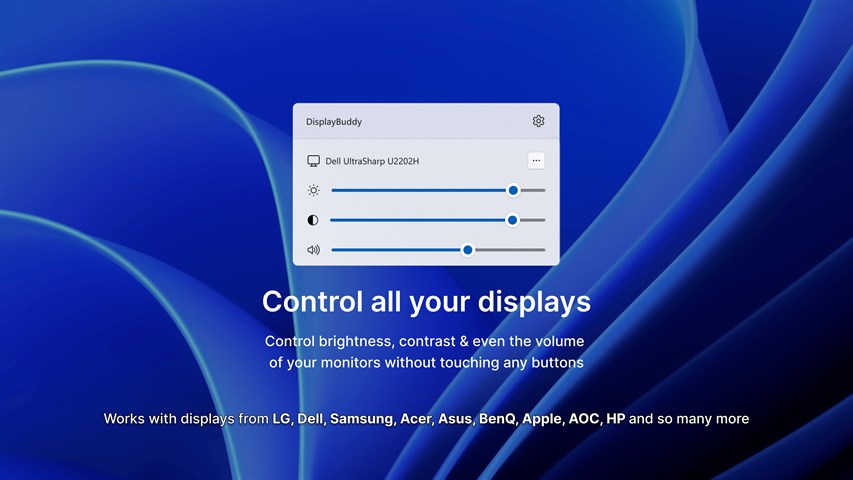
Depending on the connected display, users can manage:
Brightness and contrast
Built-in speaker volume
HDMI, DisplayPort and USB-C inputs
Resolution and rotation
Multiple connected monitors
Keyboard shortcuts can also be configured, allowing external displays to behave more like the built-in screen of a laptop.
For users with compatible monitors, this removes much of the inconvenience associated with physical display controls.
An Alternative Way to Get DisplayBuddy
Users interested in the software have several purchasing options available.
In addition to obtaining it through its standard distribution channels, users looking for alternative listings can find a DisplayBuddy CD Key on Z2U.com. When purchasing software keys through a marketplace, it is important to check the supported operating system, activation instructions and regional restrictions before ordering.
This is particularly relevant for DisplayBuddy because Mac and Windows versions should be checked carefully before choosing a license.
A Small Utility That Solves a Common Problem
DisplayBuddy is not trying to completely change how people use their computers. Instead, it focuses on fixing one of the small frustrations associated with external monitors.
Being able to adjust brightness, volume and other settings without navigating awkward physical menus can make a noticeable difference for people who use their monitors every day.
For anyone regularly switching between daytime work, gaming, movies and evening computer use, having those controls immediately available can make an external display feel much more integrated with the operating system.